


BusZone
4.5149.00 Reviews
App Specs
- Version
- 2.1.7
- Updated On
- License
- Free
- Downloads
- 10,000+
- Developer
- ByteCurve, LLC
- Categories
- Education
- Platform
- Android
Screenshots
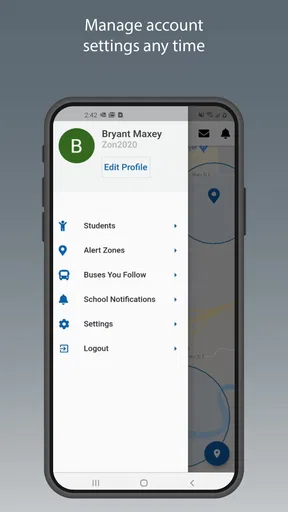
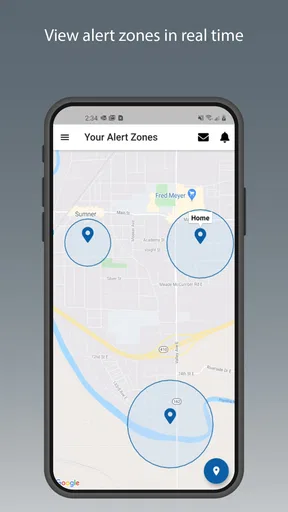
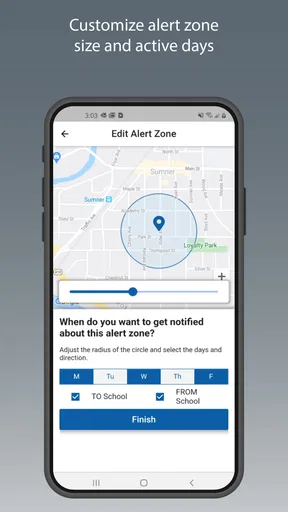
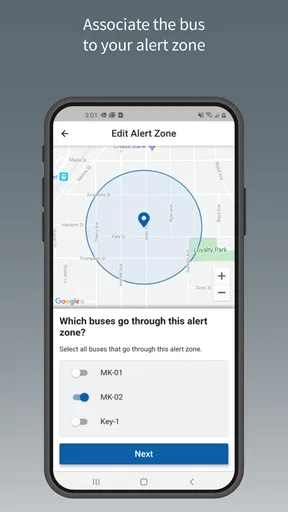
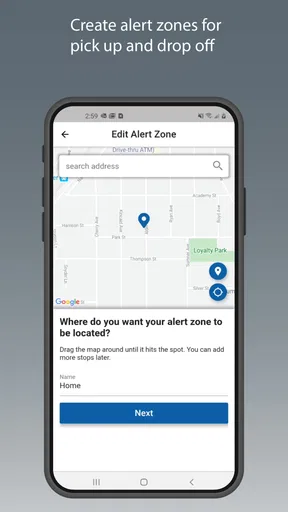
 Analysis by AppCompare
Getting a child onto the right school bus is usually a small daily task that becomes stressful when the schedule changes, traffic slows the route, or a child is waiting outside longer than expected. BusZone is an education app from ByteCurve, LLC that focuses on one practical question: where is the bus carrying your child right now? I found that its value depends less on entertainment or study tools and more on how clearly it fits into a parent’s routine when a live location is useful.
The app is free and aimed at Everyone, which makes the basic idea easy to approach for families. It has reached over 10K installs, with a 4.5 average from around 848 ratings and 149 reviews. Those figures suggest a useful level of interest without making BusZone feel like a universal household app. In my view, it is best understood as a focused tracking companion rather than a complete school communication platform.
How BusZone feels when the network matters
The central experience is tied to real-time bus location, so connectivity is not a minor technical detail here. When the phone can receive current information and the bus location is being reported, the app can replace guesswork with a more informed decision about when to leave home, meet a child, or stop waiting by the curb. That is a meaningful improvement over relying only on a printed timetable.
I would use it most during the uncertain part of a route. A normal schedule tells me when a bus is expected, but it cannot reflect every delay caused by traffic, weather, loading time, or a route running differently than usual. BusZone’s live-location purpose is more useful in that gap between the expected time and the actual arrival. The app does not need to become a full messaging service to help; a current position can already answer the immediate question.
There is an important trade-off, though. A live map is only as helpful as the connection and location information behind it. If the phone has weak reception, the service is slow to update, or the bus itself is not reporting a current position, I would not treat the last visible location as a promise. The sensible habit is to use the app as an additional signal, not as permission to ignore the school’s normal schedule or safety instructions.
That distinction matters for parents who expect a precise countdown. BusZone’s stated purpose is to show a child’s real-time bus location, but a location marker is not the same thing as an exact arrival guarantee. A bus can move through several streets before reaching a stop, and traffic conditions can change after the screen is checked. I found the app’s strongest role is helping with timing decisions, not replacing judgment.
A realistic morning routine
Imagine a child usually boards shortly after a parent starts work from home. On an ordinary morning, the parent can check the route before finishing a meeting preparation task. If the bus is progressing normally, there is less temptation to stand outside too early. If the location appears delayed, the parent can keep the child indoors for a little longer while staying aware of the expected route.
Worth Reading Before You Choose

Flipboard Shows What News Apps Must Do Beyond the Feed

Switching to Android Auto Means Rethinking Your Driving Routine

Google Calendar Makes a Crowded Week Easier to Manage

Ludo King Makes the Most of the Minutes Between Plans

Baby Panda World Brings Quick Play to Modern Phones, but Its Game Library Feels Busy

ESPN’s Live Game View Makes Following Close Games Easier
That small change can make the app worthwhile. It is not about staring at a map continuously. I would check it at a few useful moments: before getting ready, shortly before the expected pickup, and again if the route seems late. This approach keeps the live view connected to a decision instead of turning it into another notification habit.
The same workflow works after school, but the priorities change. A parent may want to know whether to walk to the usual meeting point now or wait a few minutes. A child who normally arrives at a predictable time may be delayed, and the app can provide context before the parent starts calling around. For younger children, that can reduce unnecessary time waiting outside, although an adult should still follow the family’s agreed pickup plan.
Using it away from home
Bus tracking becomes more valuable when I am not standing beside the front door. I might be at work, in a shop, or walking from another part of the neighborhood. In those situations, the app can help me decide whether I have enough time to reach the stop or whether another responsible adult should handle the pickup.
This is also where phone connectivity becomes part of the practical experience. A parent checking the app inside a building, underground area, or crowded public place should expect the current view to depend on the available connection. I would check before moving toward the stop rather than assuming the screen will update perfectly while walking. If the route is important at that moment, keeping the school’s regular timetable in mind provides a useful backup reference.
BusZone may suit families who share responsibility for transportation as well. One adult can use the location view to coordinate with another, but I would avoid treating the app as a substitute for directly confirming who is collecting the child. The map can support the handoff; it should not be the only part of the handoff plan.
What happens when updates are late
The most important test for a connectivity-dependent app is not the smooth journey. It is the moment when the screen does not seem to match what is happening outside. If the location stays unchanged, my first step would be to check whether the phone has a working connection and whether other online services respond normally. That separates a local phone problem from a route update problem.
I would then close and reopen the relevant view rather than repeatedly tapping it. If the information still looks old, I would compare it with the usual schedule and contact the school or transportation contact when the delay affects a child’s safety or pickup. This recovery process is deliberately simple, but it prevents a common mistake: assuming that a frozen marker means the bus is physically stopped.
Another useful habit is to note the last point at which the location appeared current. A previous position can provide context, but it should not be interpreted as a new movement report. I would also avoid making a child wait alone simply because the app suggests the bus is close. The app can improve awareness while the adult remains responsible for the final decision.
Families should also prepare children for the possibility that the app may not be available at the exact moment they expect. The child should know the normal stop, the agreed waiting rules, and which trusted adult to contact. That preparation is not a criticism of BusZone; it is the right response to any service whose usefulness depends on a live connection.
Keeping mobile use sensible
Because the app’s main purpose involves current location information, I would use it in short checks rather than leave it open throughout the entire route. That is more convenient, less distracting, and likely kinder to a phone’s battery and mobile connection. I would open it when a decision is needed, read the current situation, and put the phone away until the next meaningful checkpoint.
This matters especially for parents who rely on mobile data during a commute. A live location screen can encourage frequent refreshing, but constant checking rarely produces better decisions. The route may not change enough between checks to justify watching it continuously. A schedule-based routine—one check before leaving and another near the expected arrival—keeps the app useful without making it the center of the morning.
I would also avoid checking while driving. If I need the information during a car journey, I would have another adult look or pull over safely. The app is meant to reduce transport stress, not create a new distraction. The same principle applies when walking near traffic or supervising a child: the map should be a quick tool, not something that takes attention away from the surroundings.
There is a subtle difference between a data-conscious routine and an overly cautious one. The point is not to avoid using the live view; that is the feature that gives BusZone its purpose. The point is to open it at moments that affect an action. If the bus is still far from the stop, checking again every minute adds little. If the child is already waiting, a timely check may be worthwhile, but it should be combined with the family’s normal safety plan.
Where it fits among familiar alternatives
The usual alternative is a timetable, whether printed, posted by a school, or remembered from experience. A timetable is dependable as a planning baseline and does not require me to interpret a moving marker. It is also useful when the phone connection is poor. BusZone has the advantage when the real question is whether today’s route is running close to that baseline.
Another alternative is calling the school, transportation office, or another parent. Direct contact can be better when there is a serious delay, a route change, or a child who needs immediate assistance. It is slower for a simple “is the bus nearby?” check, however. I see BusZone as filling that narrow space between passive scheduling and active phone calls.
Messaging a family member may help coordinate pickup, but a message usually depends on someone already knowing what is happening. A live bus location can provide a starting point before anyone has time to reply. On the other hand, a message is better for confirming responsibility, explaining a change, or handling a situation that the map cannot describe. The strongest routine combines the app for awareness with direct communication for decisions that involve people.
Families who want homework tools, school announcements, attendance information, or two-way teacher communication should not choose BusZone expecting those broader functions. Its identity is much narrower. That focus is a strength for a parent who only needs transportation visibility, but it is a limitation for anyone looking for one app to manage every school-related task.
Who will benefit most from the focused design
I think BusZone is a good match for parents whose children use a bus route that can be tracked and whose daily schedule makes waiting inconvenient. It is particularly useful when a parent works from home, shares pickup duties, has a long walk to the stop, or regularly has to decide whether to leave an appointment in time. The app’s value grows when a few minutes of better timing make the difference between a calm handoff and an unnecessary wait.
It can also help families who are new to a route. During the first weeks, the live view may make it easier to connect the written schedule with the actual journey. Once the route becomes familiar, some parents may use it less often, but it can remain helpful on unusual days when the expected rhythm breaks.
I would be more cautious about recommending it to someone who wants guaranteed arrival times, detailed explanations for delays, or a complete emergency communication channel. A location view cannot answer every transportation question. It may also be a poor fit for a family whose bus service is not represented in the app’s usable tracking experience, since the whole benefit depends on the relevant route information being available and current.
What I would check before relying on it
Before making BusZone part of a daily routine, I would test it during a normal route rather than waiting for a stressful delay. I would learn where the bus appears, how quickly the location changes, and how the displayed position relates to the actual stop. That short trial helps set realistic expectations and shows whether the app is useful for this particular transportation arrangement.
I would also decide in advance what to do if the screen is unavailable. The backup might be the printed schedule, a call to the school, or a second adult who can meet the child. Having that plan makes the app more helpful because I am using it as one layer of preparation rather than my only source of information.
It is worth remembering that a free app can still have practical costs in attention, battery, and mobile use. Those costs are manageable when checks are brief and purposeful. I would avoid leaving the phone unlocked on a live view for an entire route, especially if I am not actively making a pickup decision.
The current version is 2.1.7, and the app supports Android 7.0 or later. That makes it accessible to people who keep an older Android phone in service, although the quality of the experience will still depend on the phone’s connection and the route information available to it. I would update the app when an update is offered through the normal platform, then test the tracking view again before relying on it for a particularly important pickup.
My connectivity verdict
After looking at BusZone as a daily transportation tool, I see a clear but limited purpose. It is most useful when I need current context around a child’s bus journey, not when I need a full school-management system. The app can turn an uncertain wait into a more informed choice, particularly for parents balancing work, errands, and pickup responsibilities.
Its biggest strength is also its main condition: the live-location experience depends on timely connectivity and current route reporting. That means I would not use a stale screen as proof that a bus is close, and I would keep the ordinary schedule and a human contact available for exceptions. Used with that discipline, the app can reduce unnecessary waiting without encouraging false certainty.
ByteCurve, LLC has kept the concept focused enough that the decision is straightforward. If real-time bus visibility addresses a recurring problem in your family, the free Education app is worth trying on a normal day and evaluating against your actual route. If you need detailed school communication, guaranteed timing, or a tool that remains equally useful without live updates, a timetable or direct school contact may serve you better.
My recommendation is therefore practical rather than enthusiastic for everyone: BusZone is a useful connected check-in for bus pickups, provided you treat it as guidance rather than a guarantee. I would keep it installed if it consistently helps me choose when to leave or wait, but I would never let a missing update replace a clear family safety plan.
Pros
- Real-time bus tracking helps reduce uncertainty at stops.
- Route maps make it easier to compare nearby services.
- Stop search quickly finds departures around your location.
- Useful alerts can help users monitor delays and service changes.
- Clean layout makes essential transit information easy to scan.
Cons
- Coverage may be limited outside supported cities and transit networks.
- Live vehicle data can be delayed or unavailable during outages.
- Some routes may have incomplete schedules or stop information.
- Location access may be needed for the most convenient features.
- Frequent travelers may find notifications difficult to customize fully.
FAQs for BusZone
What is BusZone, and what can I use it for?
BusZone is a public transport app designed to help passengers check bus routes, stops, timetables, service information, and—where supported—real-time vehicle locations. It can be useful when planning a journey, checking the next departure, or finding an alternative route during delays. The exact features and coverage depend on the city or transport network selected in the app.
Does BusZone provide real-time bus tracking and accurate arrival times?
BusZone may provide live bus positions and estimated arrival times for supported routes, but availability can vary by location and transport operator. Real-time predictions depend on data supplied by the network, GPS reception, traffic, and service disruptions. If live information is unavailable, the app may display scheduled times instead, so users should allow extra travel time.
Does BusZone work without an internet connection?
BusZone generally requires an internet connection to download current schedules, service alerts, route changes, and real-time tracking information. Some previously loaded details may remain temporarily available, but offline access should not be treated as a guaranteed feature. Before travelling, it is sensible to check the route while connected, especially if you expect poor mobile coverage.
Is BusZone free to download, and are there any additional costs?
BusZone’s availability and pricing can differ between platforms, regions, or versions of the app. Check the official Google Play Store or Apple App Store listing before downloading to confirm whether it is free, contains advertising, or offers optional in-app purchases. Even when the app itself is free, mobile data charges may apply when using maps and live transport updates.
What permissions and personal information does BusZone require?
BusZone may request location access to show nearby stops, identify your position on a map, or improve route planning. It may also use internet access for schedules, maps, alerts, and live tracking. Review the permissions during installation and in your device settings, and only enable location access when needed. Consult the app’s privacy policy for details about collected and shared data.


